FIELD NOTE / 01
Remote AI coding agents without moving the work.
A first-hand account of using one browser to steer Codex and another long-running agent on two distant computers—and an honest decision guide for MidTerm, SSH with tmux, remote desktop, and provider remote control.
By Johannes G. E. Schmidt, creator of MidTerm · Updated July 14, 2026
REAL TOPOLOGY / 02
A browser on the Baltic coast. Two agents elsewhere.
This is the workflow that caused MidTerm to exist.
While staying in Damp on Germany’s Baltic coast, I use MidTerm over a private Tailscale network. One browser tab reaches a MidTerm instance on my home PC in Nordhausen, where Codex runs beside the repo and local tooling. Another tab reaches a separate MidTerm instance on the laptop at my office, where a second agent continues its own work.
The browser carries control, not execution. Each PTY, agent process, repository, credential, build, and local service remains on its machine. I can close the MacBook, return from a phone, or change networks without moving the project into a hosted sandbox or reconstructing the terminal layout.
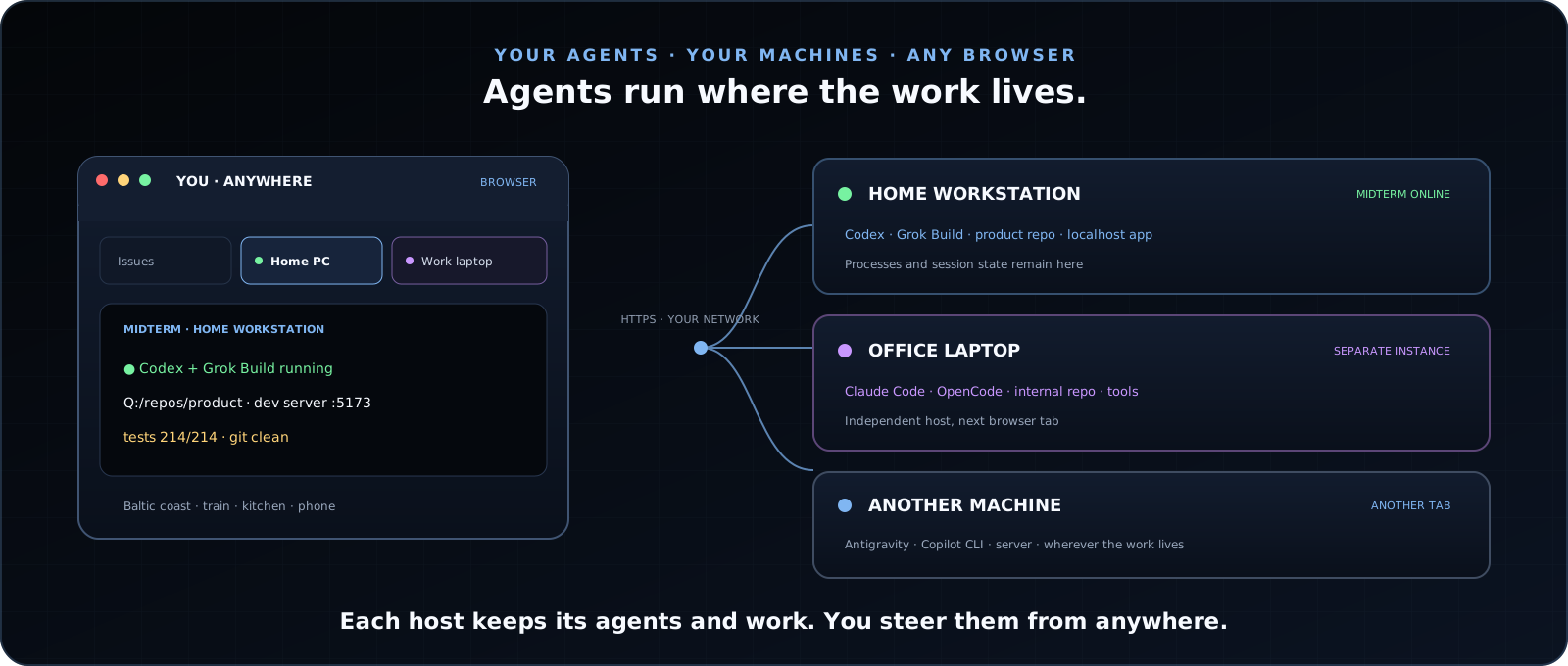
| Client | MacBook or phone browser in the place where I happen to be. |
|---|---|
| Home host | MidTerm, Codex, repositories, SDKs, credentials, tests, and local services on the home PC. |
| Office host | A second independent MidTerm instance and agent on the office laptop. |
| Network | Tailscale supplies the private encrypted path. MidTerm supplies password-protected HTTPS and the working interface. |
WHY A WORKSPACE / 03
The terminal is necessary. The surrounding context is the multiplier.
A remote terminal can carry bytes. Long-running agent work also needs stable identity, evidence, and input ergonomics.
Return to the same process
Named sessions preserve working directory, process state, scrollback, notes, drafts, attachments, and exact per-session input history.
Paste the screenshot
Ctrl/Cmd + V uploads an image to the correct host and inserts a path the terminal agent can use.
Keep the app beside the CLI
Files, Git state, logs, and the app under construction remain inspectable next to the agent instead of inside a flattened remote-desktop scene.
Use explicit control surfaces
Authenticated APIs and generated mt helpers expose sessions, browser state, repositories, history, dispatch, and checkpoints without transcript heuristics.
DECISION GUIDE / 04
Choose the boundary, not the slogan.
These tools overlap, but they optimize different units of work.
| MidTerm | Choose it when the unit of work is a real host workspace: multiple terminal agents, ordinary shells, files, Git, logs, tests, and app previews—possibly across several computers. |
|---|---|
| SSH + tmux | Choose them when a mature native-terminal workflow, standard SSH authentication, low bandwidth, and universal server availability matter more than browser-native images, files, previews, or mobile composition. |
| Remote desktop | Choose it when you need arbitrary desktop GUI applications or the exact host desktop. It transports the whole visual scene; MidTerm exposes narrower working surfaces around terminals. |
| Provider remote control | Choose it when one supported agent is the unit of work. For example, Claude Code Remote Control connects a local Claude session to Claude’s web or mobile interface. MidTerm stays provider-neutral and can hold Claude Code, Codex, Gemini CLI, OpenCode, and supporting processes together. |
The choices are not exclusive. Claude Code can run normally inside MidTerm, and you can still enable its provider-specific remote features when that path fits a particular session.
SETUP / 05
Four explicit steps.
- Install MidTerm on each computer that owns work you want to reach.
- Choose service mode for hosts that must remain available across logouts and reboots.
- Connect the host and client devices with Tailscale or another private WireGuard mesh.
- Open each host’s private HTTPS address in a browser tab and launch the CLI agents there.
Keep MidTerm’s own HTTPS and password authentication enabled, and use least-privilege Tailscale grants or ACLs. MidTerm is not a VPN and does not need a hosted relay.
LIMITS / 06
What MidTerm does not remove.
A useful remote tool should make its remaining dependencies obvious.
| Power | The host must be awake and the agent process must still be running. |
|---|---|
| Network | The browser needs a route to the host. MidTerm does not create one; Tailscale, a LAN, or another deliberate network path does. |
| Trust | Local HTTPS may use a locally generated certificate until you trust it or place MidTerm behind your own certificate endpoint. |
| Interface | The terminal remains a real terminal. MidTerm improves its browser ergonomics; it does not turn every CLI into a simplified chat app. |
ANSWERS / 07
Short answers.
Can I control Claude Code or Codex from a phone?
Yes. The CLI stays in a real PTY on its host; the authenticated browser workspace works from desktop, tablet, phone, or installed PWA.
Does MidTerm require SSH?
No SSH client or tunnel is required. A network path still is. A private Tailscale or WireGuard mesh is the recommended default.
Does MidTerm replace Claude Code Remote Control?
Not categorically. Provider remote control is excellent when one supported agent is the unit of work. MidTerm is useful when the unit of work is the host workspace: several CLIs, terminals, files, Git state, logs and app previews.
Can MidTerm control agents on several computers?
Yes. Install one independent MidTerm instance per computer and open the hosts in adjacent browser tabs. Each machine keeps its own repositories, credentials, tools and processes.